
Vuex 설치 및 등록
Vuex 설치
npm install vuex --save
Vuex 사용 방법
store를 생성 후 export 해준다.
// store.js
import { createStore } from 'vuex'

export const store = createStore({})
// main.js
import { createApp } from 'vue'
import App from './App.vue'
import store from './store/store'

createApp(App).use(store).mount('#app')
State와 getters 소개
state
여러 컴포넌트 간에 공유할 데이터 - 상태
// Vue
data : {
	message: 'Hello Vue.js!'
}

// Vuex
state : {
	message: 'Hello Vuex.js!'
}
<!-- Vue -->
<p>{{ message }}</p>

<!-- Vuex -->
<p>{{ this.$store.state.message }}</p>
getters
state 값을 접근하는 속성이자 computed()처럼 미리 연산된 값을 접근하는 속성
// store.js
state : {
	num : 10
},
getters : {
	getNumber(state) {
		return state.num
	},
	doubleNumber(state) {
		return state.num * 2
	}
}
<p>{{ this.$store.getter.getNumber }}</p>
<p>{{ this.$store.getter.doubleNumber }}{</p>
mutations와 commit() 형식 소개
mutation
- state의 값을 변경할 수 있는 유일한 방법이자 메서드
- 뮤테이션은 commit()으로 동작시킨다.
// store.js
state: {
	num: 10
},
mutations: {
	printNumbers(state) {
		return state.num
	},
	sumNumbers(state, anotherNum) {
		return state.num + anotherNum;
	}
}

// App.use
this.$store.commit('printNumbers');
this.$store.commit('sumNumbers', 20);
mutations의 commit() 형식
- state를 변경하기 위해 mutations를 동작시킬 때 인자(payload)를 전달할 수 있음
// store.js
state: { storeNum: 10},
mutations: {
	MODIFY_STATE(state, payload) {
		console.log(payload.str);
		return state.storeNum += payload.num;
	}
}

// App.vue
this.$store.commit('MODIFY_STATE', {
	str: 'passed from payload',
	num: 20
});
state를 mutations로 변경하는 이유
- 여러 개의 컴포넌트에서 아래와 같이 state 값을 변경하는 경우 어느 컴포넌트에서 해당 state를 변경했는지 추적하기가 어렵다
const increaseCounter() { this.$store.state.counter++; }
- 특정 시점에 어떤 컴포넌트가 state를 접근하여 변경한 건지 확인하기 어렵기 때문
- 따라서, 뷰의 반응성을 거스르지 않게 명시적으로 상태 변화를 수행 (반응성, 디버깅, 테스팅 혜택)

actions 소개
actions
- 비동기 처리 로직을 선언하는 메서드. 비동기 로직을 담당하는 mutations
- 비동기 : 특정 코드가 끝날 때까지 코드의 실행을 멈추지 않고 다음 코드를 먼저 실행하는 것
- 데이터 요청, Promise, ES6 async과 같은 비동기 처리는 모두 actions 선언
- 로직 담당
// store.js
state: {
	num: 10
},
mutations: {
	DOUBLE_NUMBER(state) {
		state.num * 2;
	}
},
actions: {
	delayDoubleNumber(context) { // context로 store의 메서드와 속성 접근
		context.commit('DOUBLE_NUMBER');
	}
}

// App.vue
import { useStore } form "vuex"

const store = useStore();

store.dispatch("delayDoubleNumber");
// actions 로직 담당 예제
state: {
	counter: 0
},
mutations: {
	ADD_COUNTER(state) {
		state.counter++
	},
},
actions: {
	delayAddCounter(context) {
		setTimeout(() => context.commit("ADD_COUNTER"), 2000);
	}
}

// App.vue
// store 선언 ...

store.dispatch("delayAddCounter");
// actions 서버 통신 로직 예제
state: {
	product: {}
},
mutations: {
	SET_DATE(state, fetchData) {
			state.product = fetchData
	}
},
actions: {
	fetchProductData(context){
		return axios.get('<https://domain.com/products/1>')
								.then(res => context.commit('SET_DATA', res);
	}
}

// App.vue
// store 선언 ...

store.dispatch("fetchProductData")
비동기 처리 로직을 actions에 선언하는 이유
- 언제 어느 컴포넌트에서 해당 state를 호출하고, 변경했는지 확인하기 어려움
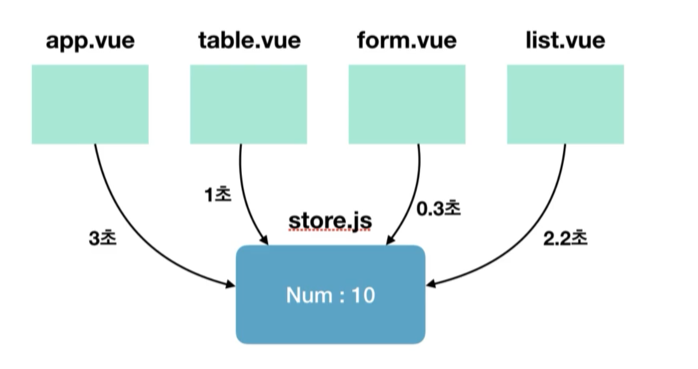
결론 : state 값의 변화를 추적하기 어렵기 때문에 mutations 속성에는 동기 처리 로직만 넣어야 한다.
반응형
'개발지식 > Vue' 카테고리의 다른 글
| [Vue3] Vite로 Vue 시작하기 (2) | 2024.09.25 |
|---|---|
| [Vue3] Vuex - 이론편 (0) | 2024.09.18 |
| [Vue3] Vue 컴포넌트 (1) | 2024.02.15 |
| [Vue3] Vue js란? (0) | 2024.02.14 |